Prompt Game
A browser game about directing AI coding assistants. It works like Scratch, but the blocks are prompt fragments. You build a prompt, a simulated AI builds a contact form from it, and you check the result against the client's brief.
- Status
- Live
- Stack
- Vanilla JavaScript, No build step, No dependencies, Node test runner
- Tests
- 37 Node tests, plus a render check across all 144 prompts
Play level 1: Vagueness has a cost
A landscaping company wants a contact form. Build a prompt from the chips and press Run. Then tick the brief items you think the build meets and press Check. A round takes about two minutes.
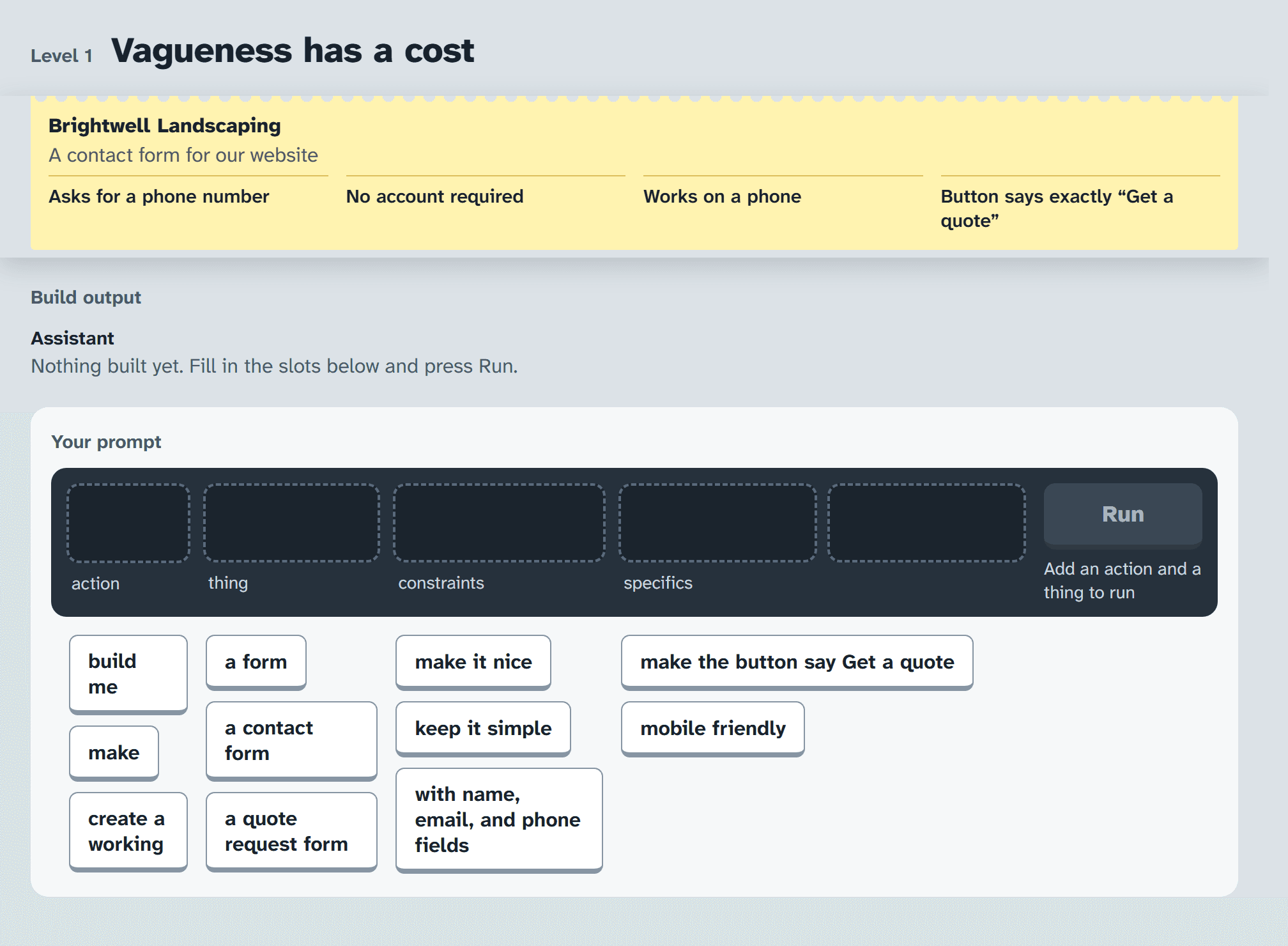
The demo loads the live game from GitHub Pages. On a phone it opens full screen instead.
Why I built it
Prompt Game is a project in the field I'm interested in: AI and education. I think AI could bring major changes to how education works, and that's something I really believe in. That's why I made this project.
The game teaches by letting the player get it wrong. There is no list of prompting tips to read first. The player builds a prompt, sees what the AI built from it, and checks that against the client's brief. The lesson comes from what happens on screen.
Why the AI is simulated
The game could call a real model. It uses a simulated one for four reasons.
- The failure has to happen every time
- The level teaches that a vague prompt gets filled in with someone else's defaults. A real model might guess right by luck, or fail a different way on each run, and then the level teaches nothing. Here a vague prompt fails the same way every time, and a precise prompt passes every time.
- Every prompt can be tested
- The interpreter takes the placed fragments and returns a build spec, with nothing random in between. Every prompt the rail can produce (144 of them) is graded in CI and checked against a snapshot. A live model cannot be tested that way.
- It needs nothing to run
- The game is static files, so it runs from GitHub Pages or from opening index.html. There is no API key, no backend, and no bill for anyone who plays it.
- The AI's confidence is written on purpose
- The report is built from the build spec, so it always describes what the AI actually built, and it always sounds sure of itself. The gap between that report and the brief is what the player learns to check.
The trade-off is that the player picks from fixed fragments instead of typing freely. So the game teaches a habit, being explicit about what matters and then checking the result, instead of the quirks of any one model.
How it works
No build step, no server, and no dependencies. Each file has one job.
js/level1.js- Holds everything the level says and decides, as data: the fragments, what each fragment does to the build, the AI's defaults, the report, and the brief.
js/interpreter.js- The simulated AI. Each fragment's effects apply in order of how plainly they were said (implied, then vague, then explicit), and the last write wins. It records which chip set each property, so a failed brief item can point at the chip behind it.
js/renderer.js- Draws the built page into a desktop frame and a phone frame at real CSS pixel widths. A layout that is too wide for a phone is actually too wide on screen.
js/builder.js- The prompt rail. Chips move by drag, by tap, or by keyboard.
js/review.js- The brief. Tick what you think the build does, then check it.
npm test builds every prompt the rail can produce (144 of them) and checks the grades against a snapshot. tests/render-check.html draws all 144 builds in both device frames and confirms that what is on screen matches the grader.
What I would do differently
Three things I would change if I built it again.
Show the controls on screen
To place a chip you tap the chip and then tap a socket, and nothing tells you that until you have already tapped a chip. I tested every prompt the game can grade, I did not test the first ten seconds of a new player.
Run the render check in CI
tests/render-check.html passes, but only when someone opens it. It should run headless on every push next to the Node tests, so a CSS change cannot break the phone frame without anyone noticing.
Make the brief data instead of code
Each requirement is a JavaScript function, so adding a second level means writing code. Simple rules like "field.phone must be true" would let a level be written as content and checked before it loads.